


As a frontend developer, fetching data from a service is one of the first skills you learn, no surprises there. Want to display data on a new page? Simply save it in your state and render it out. Easy, right? Need to manage loading and error states as well? No problem, just add some more useState hooks. However, things get tricky when you want to refresh data from a different component.
In this article, I’ll walk you through common challenges regarding data state management you might have encountered, or will encounter when aiming to level up your React frontend application, and how to solve them efficiently with Tanstack Query.
So, How Do You Request Server Data in React?
Normally, you would fetch data from the server using an API call and store it in your state, like in the example below:
function PokemonPage() {
  const [id, setId] = useState(1);
  const [pokemon, setPokemon] = useState(null);

  useEffect(() => {
    async function fetchPokemon() {
      setPokemon(null);
      const res = await fetch(`https://pokeapi.co/api/v2/pokemon/${id}`);
      const data = await res.json();
      setPokemon(data);
    }
    fetchPokemon();
  }, [id]);

  return (


    >
  );
}
This code will render a card displaying the image, name, and ID of the current Pokémon. The ButtonGroup component will render buttons for navigating to the previous or next Pokémon.
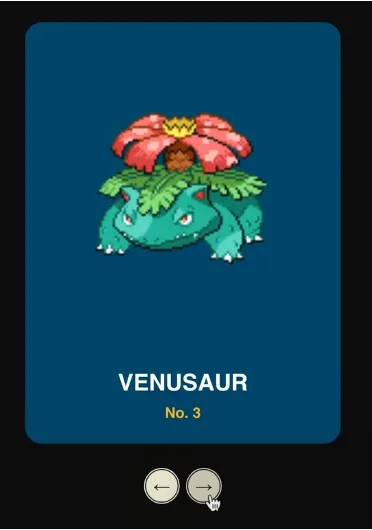
While this works fine for simple cases, the code isn’t production-ready yet. What if you want to inform the user that data is being fetched? Or notify them if the fetch fails?
“No worries, I am an excellent programmer, so I’ll fix it myself!” ~ Famous last words from an average programmer
Let’s Improve
To address this problem, I’ll add two new states to the page that allow the PokemonCard to render appropriately during loading or when an error occurs. This results in the following code:
function PokemonPage() {
  const [id, setId] = useState(1);
  const [pokemon, setPokemon] = useState(null);
  const [isLoading, setIsLoading] = useState(true); //
  const [error, setError] = useState(null); //

  useEffect(() => {
    async function fetchPokemon() {
      setPokemon(null);
      setIsLoading(true); //
      setError(null); //

      try {
        const res = await fetch(`https://pokeapi.co/api/v2/pokemon/${id}`);
        if (!res.ok) {
          throw new Error(`Error fetching pokemon #${id}`);
        }
        const json = await res.json();
        setPokemon(json);
        setIsLoading(false); //
      } catch (e) {
        setError(e.message); //
        setIsLoading(false); //
      }
    }

    fetchPokemon();
  }, [id]);

  function handleSetId(newId) {
    setId(newId);
  }

  return (


    >
  );
}
This is already a big improvement! To test it, I gave it a manual stress test by rapidly clicking the next button. Here’s what happens: since the ID changes frequently, the fetch function is called multiple times in quick succession, but the response times vary unpredictably. For instance, the fetch for ID 2 might take longer than the fetch for ID 3. This creates a race condition, causing Pokémon to sometimes appear out of order.
Fixing the race condition
I’ve seen this issue before. The solution is to prevent fetches and state updates when the component is being unmounted. We can do this by keeping track of an “ignore” boolean. When this boolean is true, the state from the incoming fetch response won’t be set. This boolean is toggled to true when the page unmounts:
function PokemonPage() {
  const [id, setId] = useState(1);
  const [pokemon, setPokemon] = useState(null);
  const [isLoading, setIsLoading] = useState(true);
  const [error, setError] = useState(null);
  const ignore = useRef(false); //

  useEffect(() => {
    ignore.current = false; //

    async function fetchPokemon() {
      setPokemon(null);
      setIsLoading(true);
      setError(null);

      try {
        const res = await fetch(`https://pokeapi.co/api/v2/pokemon/${id}`);
        if (ignore.current) return;
        if (!res.ok) {
          throw new Error(`Error fetching pokemon #${id}`);
        }
        const json = await res.json();
        if (ignore.current) return; //
        setPokemon(json);
        setIsLoading(false);
      } catch (e) {
        if (ignore.current) return; //
        setError(e.message);
        setIsLoading(false);
      }
    }

    fetchPokemon();

    return () => {
      ignore.current = true; //
    };
  }, [id]);

  function handleSetId(newId) {
    setId(newId);
  }

return (


    >
  );
}
Fortunately, this simple trick solves the race condition. However, I notice my code is already getting quite long, and this is just for the first page! I’m planning to add LEGO, Yu-Gi-Oh, Beyblade, and Zelda pages as well. There’s no way I want to repeat this logic each time. So, being a good programmer, I’ll make this reusable and generic to prevent code duplication and increase maintainability.
Making It Generic
To reduce the amount of repetitive code I have to write, I’ll create a custom useQuery hook that fetches and stores data inside a component based on a given URL. This hook can be reused across any component, letting me focus less on managing data, loading, error states, or race conditions:
export function useQuery(url) {
  const [data, setData] = useState(null);
  const [isLoading, setIsLoading] = useState(true);
  const [error, setError] = useState(null);
  const ignore = useRef(false);

  useEffect(() => {
    ignore.current = false;

    async function fetchData() {
      setData(null);
      setIsLoading(true);
      setError(null);

      try {
        const res = await fetch(url);
        if (ignore.current) return;
        if (!res.ok) {
          throw new Error('A network error occurred.');
        }
        const json = await res.json();
        if (ignore.current) return;
        setData(json);
        setIsLoading(false);
      } catch (e) {
        if (ignore.current) return;
        setError(e.message);
        setIsLoading(false);
      }
    }

    fetchData();

    return () => {
      ignore.current = true;
    };
  }, [url]);

  return { data, isLoading, error };
}
Nice and tidy, I like it! But what happens if multiple components use this hook with the same URL? Multiple requests will be sent to the same endpoint. Or what if the cached state becomes outdated? You’d then have to manually invalidate every single hook.
One solution could be to store the state inside a custom context. This makes the state predictable and easily accessible from anywhere. However, this approach introduces its own problem: whenever any state in the context or store updates, all components subscribed to that store will rerender. Even components that don’t use the particular updated state. We could prevent this by splitting up the context, but this can become a tedious process when your application grows. Therefore, this method can be inefficient and is not the most optimal.
What else do we need?
Beyond the issues we’ve already covered, my React application still isn’t at the professional level I’m aiming for. What if I want to fetch data for a page the user is likely to visit in the future (lazy loading)? Or implement pagination effortlessly? How can I support background data updates, cache invalidation, and request deduplication?!?!

Introducing Tanstack Query
Luckily, we don’t have to solve all these challenges ourselves. Let’s take a look at the library Tanstack Query. Previously, React Query.
“The missing piece for data fetching in React.” ~ Trust me bro
Queries
First, with this library, you get access to the useQuery hook. This hook allows you to fetch and cache data from a server.
import React from 'react';
import { useQuery } from '@tanstack/react-query';
async function getTodos() { //
const response = await fetch('/api/todos');
if (!response.ok) {
throw new Error('Network response was not ok');
}
return response.json();
}
export default function TodosPage() {
const { isLoading, isError, data, error } = useQuery({
queryKey: ['todos'], //
queryFn: getTodos, //
});
if (isLoading) {
return Loading...;
}
if (isError) {
return Error: {error.message};
}
return (
{data.map((todo) => (
- {todo.title}
))}
);
}The useQuery hook requires two main parameters: queryKey and queryFn. The queryKey is an array that serves as a unique identifier for the data returned by the query function, while the queryFn is the callback function that performs the actual data request to your service.
What’s great about this hook is that it automatically returns useful lifecycle states, so you don’t have to manually manage loading or error states anymore.
In this example, when TodosPage mounts, the queryFn is called to fetch the todos from the API. If the response is successful, the JSON data is cached under the key ['todos']. During the fetch, isLoading is true, and since no error occurs, isError is false and error is null. Once the fetch completes, the data property receives the fetched value and renders it.
A particularly cool feature of the useQuery hook is that if you navigate away from this page and come back later, the cached query under the ['todos'] key is still active. This means the data is retrieved instantly from the cache without needing to fetch it again from the API. This improves your app’s perceived speed significantly. Now you are one step closer to a professional React application!
Mutations
Besides fetching data, Tanstack Query provides the useMutation hook to mutate data on your server. You can use this with POST, PUT, PATCH, or DELETE HTTP methods.
import React from 'react';
import { useQueryClient, useQuery, useMutation } from '@tanstack/react-query';
async function getTodos() { ... }
async function postTodo(newTodo) { //
const response = await fetch('/api/todos', {
method: 'POST',
headers: { 'Content-Type': 'application/json' },
body: JSON.stringify(newTodo),
});
if (!response.ok) {
throw new Error('Failed to post todo');
}
return response.json();
}
export default function TodosPage() {
const queryClient = useQueryClient();
const { data, isLoading, isError, error } = useQuery({ ... });
const mutation = useMutation(postTodo, { //
onSuccess: () => {
// Invalidate and refetch
queryClient.invalidateQueries(['todos']);
},
});
function onButtonClick() { //
mutation.mutate({
id: Date.now(),
title: 'Do Laundry',
});
}
...
return (
{data.map((todo) => (
- {todo.title}
))}
>
);
}When you click the button in this example, the mutate function is called with the necessary variables for the fetch. The useMutation hook also accepts useful options like the onSuccess callback, which triggers after a successful mutation, making it easier to manage side effects.
In addition to basic use cases, useMutation supports advanced features such as optimistic updates, automatic retries, and detailed lifecycle states, including error and isPending, that keep your UI in sync with the mutation state.
These features make Tanstack Query a powerful and flexible framework for handling server state mutations in professional React applications.
Query Invalidation
As mentioned earlier, when you fetch data using Tanstack Query’s useQuery hook, the data is cached under your queryKey. This dramatically improves performance because when you mount that hook again, the library returns the cached data instantly instead of refetching from the server.
However, this comes with a trade-off in predictability. There’s a good chance the server data has changed while you’re still retrieving the stale cached data.
To bridge this gap between displayed and up-to-date server data, you need to occasionally remove or invalidate your cache so the latest data can be fetched again. This process is called Query Invalidation.
A common best practice is to clean or refresh your cache at least every five minutes. In Tanstack Query, you can set this by configuring the staleTime option to 5 * 60 * 1000 milliseconds. This tells the library how long to consider the cached data fresh before marking it stale and refetching in the background.
Sometimes, you also know exactly when to invalidate the cache manually. For example, if you have three todos cached, and the user adds a fourth todo to the server, your cached list of three todos is no longer valid. By invalidating the specific queryKey (e.g., ['todos']), Tanstack Query will refetch and retrieve the updated list.
This invalidation can be done programmatically using the invalidateQueries method on the QueryClient, like so:
queryClient.invalidateQueries({ queryKey: ['todos'] })This marks the queries with the key ['todos'] as stale and triggers a refetch, ensuring your UI displays the most current data from the server without your users noticing stale content for long.
Pagination
Pagination is a common feature in professional React applications. It allows you to fetch only a portion of your list at a time, reducing the load on both the frontend and backend. For example, suppose you have 100 todos in your server database. You display them in a table divided into 10 pages, fetching 10 todos per page.
While implementing pagination can sometimes be tricky, Tanstack Query makes it straightforward:
const [page, setPage] = useState(1);

const { data, isLoading, isError, error } = useQuery({
  queryKey: ['todos', page],
  queryFn: () => fetchTodos(`/todos?page=${page}`),
});
When you update the page state, the queryKey changes from ['todos', 1] to ['todos', 2]. Since Tanstack Query does not find cached data for the new key, it triggers the query function and fetches the appropriate page of todos. Your UI updates automatically, benefitting from useful lifecycle states like isLoading and isError.
Optimistic Updates
If you’ve followed the article so far, I’d like to introduce one of the more advanced features of Tanstack Query: optimistic updates. This pattern further enhances your React app’s performance and user experience.
Let’s revisit the todos example. Suppose you have a list of three to-do items and are about to add a fourth. When the user submits the new item, you already expect that a subsequent fetch will return a list with four items, assuming everything succeeds.
Instead of waiting for the server response, you can optimistically update the cache by manually adding the new item to it. This way, the UI instantly reflects a list of four todos as soon as the user submits, making it feel like the server responded immediately. Pretty cool, right? Here’s how you do it.
import { useQueryClient, useMutation } from '@tanstack/react-query';

const queryClient = useQueryClient();

const mutation = useMutation(updateTodo, {
  onMutate: async (newTodo) => {
    // Cancel any outgoing refetches (so they don't overwrite our optimistic update)
    await queryClient.cancelQueries({ queryKey: ['todos'] });

    // Snapshot the previous value
    const previousTodos = queryClient.getQueryData(['todos']);

    // Optimistically update to the new value
    queryClient.setQueryData(['todos'], (old) => [...old, newTodo]);

    // Return a context object with the snapshotted value
    return { previousTodos };
  },
  // If the mutation fails,
  // use the context returned from onMutate to roll back
  onError: (error, newTodo, context) => {
    if (context?.previousTodos) {
      queryClient.setQueryData(['todos'], context.previousTodos);
    }
  },
  // Always refetch after error or success
  onSettled: () => {
    queryClient.invalidateQueries({ queryKey: ['todos'] });
  },
});
My Implementation
As with React itself, Tanstack Query gives you a lot of flexibility to implement solutions however you see fit. This freedom is good because every application has its own unique requirements. However, the downside is that if you don’t implement your solution consistently or correctly, it can quickly become difficult to maintain or extend over time. That’s why I’d like to share my approach and best practices based on my own implementation experience.
Structure
In my React project root, I maintain a folder called services, which contains a subfolder called api. For each domain object, I create a JavaScript file where I define client calls to my server for that entity.
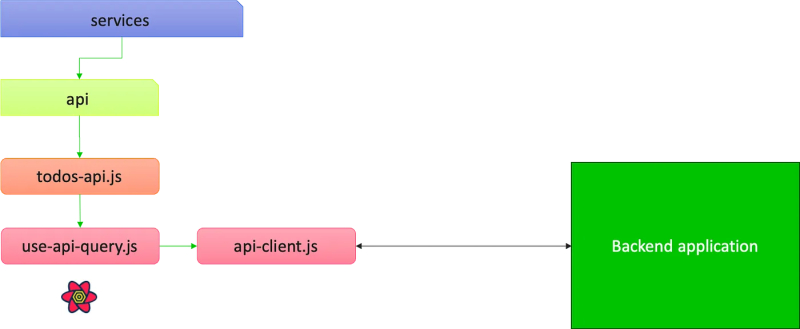
For example, in todos-api.js:
export function useGetTodo(id) {
  return useApiQuery(['todos', id], `/todos/${id}`);
}

export function useGetAllTodos() {
  return useApiQuery(['todos'], '/todos');
}
These functions leverage my custom useApiQuery hook, which is a wrapper around Tanstack Query’s useQuery hook. It has generic logic such as handling access tokens and constructing paginated query keys:
The benefit of this approach is that your complex mapping to your server has to be written only once. After that, you can easily extend your application by creating more entity endpoints.
Final Result
With all this new knowledge, you can now retrieve your server data with a one-liner in your Professional React application. With all the benefits of Tanstack Query!
import React from 'react';
import { useParams } from 'react-router-dom';
import { useGetPerson } from './hooks/useGetPerson'; // Adjust import path
export default function TodoPage() {
const { id } = useParams();
const { data: todo, isLoading, isError, error } = useGetTodo(id);
if (isLoading) return Loading...
;
if (isError) return Error: {error.message}
;
return (
Thank you for reading {person.name}!
);
}